How to Implement CQRS and MediatR in ASP.NET Core 10 Web API Using C# – Complete Guide (2026)
A product API often starts with a controller calling one service that handles every read and write. That is a sensible starting point. As validation rules, permissions, integrations, and read projections grow, the service can become difficult to change safely. CQRS and MediatR in ASP.NET Core 10 offer a way to organize those use cases explicitly.
This complete C# tutorial separates product commands from queries, uses MediatR to dispatch them, and stores data through Entity Framework Core and SQL Server. You will build a small Clean Architecture solution, add validation and logging behaviors, return appropriate HTTP responses, create migrations, and write focused handler tests.
Quick answer: CQRS separates operations that change state from operations that read it. MediatR dispatches an in-process request to its handler. Register the application assembly with AddMediatR, send commands and queries through ISender, and use pipeline behaviors for shared concerns. CQRS does not require separate databases or event sourcing.
Research and execution status: Official Microsoft, MediatR, NuGet, and vendor licensing sources were checked on November 4, 2026. The sample targets net10.0 and MediatR 14.2.0. No .NET SDK is available in this authoring environment, so the application and tests have not been compiled or executed here. JSON and HTTP results below are expected examples, not captured test evidence. No performance benchmarks are claimed.
Understand CQRS, the mediator pattern, and Clean Architecture
CQRS separates intent and read projections
A command changes state: create a product, update its price, or delete it. A query returns information without intentionally changing business state. In this example, commands work with a product entity and queries return a ProductDto projection. They share one SQL Server database.
More advanced systems can maintain separate read stores, but then synchronization, lag, failure recovery, and operational complexity become part of the design. Start with a shared database unless the workload justifies more. CQRS and event sourcing are different decisions; this tutorial stores current rows, not a historical event stream.

The mediator pattern and MediatR
A mediator reduces direct coupling between callers and application operations. The controller constructs a request and asks ISender to send it. MediatR resolves the matching handler and executes registered behaviors around it. The controller does not choose the EF repository implementation.
MediatR is in-process dispatch. It does not supply a durable message broker, background job queue, distributed transaction, or automatic retry policy. Send handles a request/response use case; notifications are a different mechanism and are not used for CRUD here.
Clean Architecture controls dependency direction
The Domain project contains the product entity. Application contains requests, handlers, DTOs, and a persistence interface. Infrastructure implements that interface with EF Core. API owns HTTP concerns and wires implementations together at startup.
Application depends on Domain; Infrastructure depends inward on Application. The API composition root references Infrastructure to register concrete services. Moving files into folders alone does not enforce these boundaries, which is why this sample uses separate projects.
When CQRS helps—and when a layered service is enough
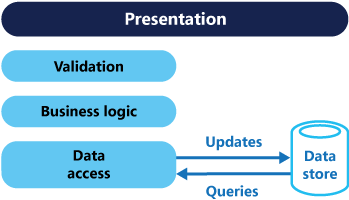
CQRS can help when reads need different shapes from writes, business operations deserve clear names, teams need focused use-case tests, or shared validation and logging should run consistently. It can coexist with layers: CQRS organizes operations, while Clean Architecture organizes dependencies.
For a small admin screen with straightforward CRUD and little business logic, a controller and a well-designed service may be easier to maintain. CQRS adds request types, handlers, registration, behaviors, and navigation overhead. MediatR dispatch alone does not make a system faster, more secure, or “clean.”
The CRUD operations here are deliberately familiar so you can see the plumbing. In a real domain, commands such as ApproveProductForSale or ChangeContractPrice may communicate intent better than a generic update operation.
Current MediatR licensing and package requirements
The checked NuGet release is MediatR 14.2.0, compatible with .NET 10. Current code is offered under RPL-1.5 or the vendor’s alternative commercial agreement. RPL has reciprocal obligations; it is not an unconditional permissive license for proprietary applications.
The vendor identifies 13.0.0 as the commercial-licensing transition. Earlier releases retain their original licenses, but that does not make downgrading a maintenance strategy. A free Community license exists with eligibility conditions, including financial and organizational exclusions. Check the current licensing FAQ and license text against your use case.
For an applicable keyed license, supply your own key through protected configuration. The code supports that without committing it. Suppressing a license warning does not grant usage rights. This tutorial does not obtain or purchase a license for you.
The current MediatR package includes DI registration. Do not add an old, separate DI extension package from an outdated guide. No AutoMapper or FluentValidation dependency is needed for this implementation.
Prerequisites and solution setup
Install a .NET 10 SDK, an IDE that supports it, SQL Server or SQL Server Express, and Postman. On Windows, SQL Server Express LocalDB works for this development example. On another operating system, use a reachable SQL Server instance and replace the connection string.
Run these commands from a new working directory. They create four production projects and one xUnit test project. The commands use forward-slash paths so they are readable across shells.
The 10.0.* selectors resolve available servicing versions on the .NET/EF Core 10 line. After restore, inspect the resolved versions, align EF Core tooling/provider versions, and pin exact package versions or use a reviewed lock file in source control. Avoid unintentionally adding an 11.x preview.
Remove the generated placeholder Class1.cs files from the three class libraries. Replace the empty web project’s Program.cs and settings with the files below. Keep nullable reference types and implicit usings enabled.
Project and folder structure
| Project | Files to add |
|---|---|
| src/Catalog.Domain | Product.cs |
| src/Catalog.Application | Products/Contracts.cs, Products/Commands.cs, Products/Queries.cs, Behaviors/ValidationBehavior.cs, Behaviors/LoggingBehavior.cs |
| src/Catalog.Infrastructure | Data/CatalogDbContext.cs, Products/EfProductRepository.cs; generated Data/Migrations |
| src/Catalog.Api | Program.cs, appsettings.json, Controllers/ProductsController.cs, Errors/ApiExceptionHandler.cs |
| tests/Catalog.Application.Tests | HandlerTests.cs, FakeProductRepository.cs |
Step 1: Add the domain entity and application contracts
This entity is intentionally small. A richer domain should enforce its invariants through appropriate methods/value objects; request validation is not a replacement for business rules. Prices use decimal, and the sample accepts positive amounts with up to two decimal places.
The repository is a narrow application port. It exposes concrete operations rather than IQueryable, allowing handler unit tests to substitute it without mocking EF’s query provider. A repository is not mandatory for CQRS: a focused application could inject a suitable context abstraction directly. Here it serves the dependency boundary and testing example.
The read methods return DTOs. FindForUpdateAsync returns an entity for mutation. Keeping this distinction visible makes the read/write intent easier to review even though both methods ultimately use the same database.
Step 2: Implement commands and command handlers
Each command has one handler with a specific response type. Create returns the new projection after saving; update and delete return a boolean so the HTTP adapter can distinguish success from a missing product. Returning data from a command does not prevent a pragmatic CQRS design.
Every database operation is awaited, and the request cancellation token travels to the repository. The update path changes the tracked entity before saving. The delete path removes it before saving. A missing record ends the operation without calling SaveChanges.
Step 3: Implement queries and query handlers
The query handlers delegate to explicit read operations. They never call SaveChanges. Product lists use a stable ID ordering and bounded page sizes; the validation behavior enforces those bounds. This is basic offset pagination—large datasets may need keyset pagination and different indexing.
Step 4: Add MediatR validation and logging behaviors
A pipeline behavior wraps a handler. The validation behavior below performs deterministic product input checks for the marker interfaces in this sample, then either throws a structured validation exception or invokes the next delegate.
This implementation has no external validation package. For a larger application, dedicated validators per request can be easier to extend. Keep database-dependent rules, uniqueness constraints, and authorization decisions in the appropriate application/domain/storage layers. A pre-query uniqueness check alone cannot prevent a race; a database constraint may still be required.
The logging behavior records request type, completion, and elapsed time. It deliberately avoids serializing request bodies, credentials, or response payloads. Its duration is an operational observation for a request, not a claim about MediatR overhead or a benchmark.
We register logging before validation so logging wraps the validation and handler path. Invalid requests short-circuit before persistence. ASP.NET Core model binding still handles malformed JSON and binding failures before MediatR is invoked; not every HTTP 400 travels through this pipeline.
Step 5: Implement EF Core and SQL Server persistence
Reads project only the required fields and use AsNoTracking. Mutation lookups stay tracked so EF can detect changes. The repository and context are scoped; never register this context as a singleton or run concurrent EF operations on the same instance.
The repository does not promise to hide all database differences. SQL translation, decimal precision, constraints, and concurrency still need SQL Server integration tests. For a simpler baseline before comparing the CQRS organization, see the published ASP.NET Core 10 CRUD with EF Core and SQL Server guide.
Step 6: Map validation and unexpected failures to HTTP problems
The handler returns 400 with validation errors, 409 for an EF concurrency exception, and a generic 500 for unexpected failures. The trace ID helps correlate a safe response with server logs. Database messages, connection strings, and stack traces are never placed in the response body.
The sample does not configure a rowversion/ETag policy, so not every competing update is detected—ordinary updates may be last-writer-wins. Add optimistic concurrency tokens when the business requires lost-update protection. A 409 mapping alone does not create that protection.
In .NET 10, middleware diagnostics for exceptions handled by IExceptionHandler are suppressed by default. This handler logs unexpected errors explicitly. If you change diagnostics behavior, coordinate it with your own logging to avoid duplicate exception reports. The published global exception-handling tutorial covers this area in more detail.
Step 7: Keep the API controller focused on HTTP
The controller translates HTTP inputs into commands or queries and translates results into status codes. It does not contain SQL or choose handler implementations. ISender is sufficient because these actions only send requests, rather than publish notifications.
- GET collection or an existing product: 200 OK.
- POST: 201 Created, with a Location header pointing to the individual GET.
- Successful PUT and DELETE: 204 No Content.
- Missing product: 404 Not Found.
- Invalid bound request values: 400 Bad Request.
IDs are generated by SQL, not accepted from the body. The current example is an unauthenticated local exercise. Before deployment, enforce authentication, operation-specific authorization, rate limits, and tenant boundaries. The published JWT authentication guide is a related starting point; choose the identity architecture appropriate to your system.
Step 8: Configure DI, MediatR, OpenAPI, and app settings
Assembly scanning targets CreateProduct in Application, where all five handlers live. Scanning only the API assembly would miss them. Behaviors are registered explicitly with AddOpenBehavior. Infrastructure implementations are wired up here, keeping the Application project independent of EF Core.
The SQL connection and optional license value are empty on purpose. Supply the actual values through protected configuration, rather than storing credentials in the repository.
The LocalDB connection is for Windows development. Its certificate-trust override is development-only; production SQL needs encryption and valid certificate validation. Replace the instance and authentication settings for your actual SQL Server. Secret Manager is not encrypted storage and is not a production vault.
In production, a protected secret provider or environment values such as ConnectionStrings__CatalogDatabase and MediatR__LicenseKey can supply configuration. Restrict hostnames instead of leaving the sample’s wildcard host configuration, configure HTTPS correctly, and protect documentation if exposing it outside Development.
Step 9: Create the database with EF Core migrations
Run these commands from the solution root after adding every file. The infrastructure project contains the DbContext and migrations; the API startup project supplies configuration and dependency registration.
The explicit Development environment loads user secrets for the startup project. The local database identity needs permission to create the development database/schema. Inspect the generated migration and history table. Do not mix EnsureCreated with this migrations workflow.
For production, generate and review deployment scripts or a migration bundle, back up appropriately, and use a deployment identity with the required schema permissions. The normal API identity should have only the permissions its operations need.
Trace one request from controller to database
For POST /api/products, model binding constructs ProductBody. The controller sends CreateProduct through ISender. Logging starts, validation checks the command, and MediatR dispatches it to CreateProductHandler. The handler creates the entity, calls the repository, and awaits SaveChanges. SQL assigns the ID, the handler returns a DTO, and the controller sends 201 Created.
For GET /api/products/1, the same dispatch pipeline selects GetProductHandler. Infrastructure executes an untracked projection and returns a DTO or null. There is no write or asynchronous message queue hidden between these steps. Exceptions unwind through the behavior stack to the HTTP exception handler.
Test the endpoints with Postman and OpenAPI
With the local app running, open or import http://localhost:5080/openapi/v1.json. This is the built-in OpenAPI JSON endpoint in Development. An interactive Swagger UI is optional and is not installed by this sample.
Create and read a product
Expect 201 and a body similar to the example below. Use the actual returned ID and Location header for subsequent requests; ID 1 is illustrative.
Send GET http://localhost:5080/api/products/1 and GET http://localhost:5080/api/products?page=1&pageSize=20. Expect 200 with an object and an array respectively. Check the request-type log entries and EF SQL logs while developing.
Update and delete
Expect 204 with no body. Read the product again and expect the new price. Then send DELETE http://localhost:5080/api/products/1: expect 204, followed by 404 from a later GET. A repeated DELETE also returns 404.
Exercise validation and missing-resource paths
POST a negative price, whitespace-only name, or a price with three decimal places. Expect 400 without a database write. A validation response can contain these fields; the trace ID and optional framework fields vary:
Also try pageSize=101, ID 0, and an unknown positive ID. A non-integer path such as /api/products/abc fails the route constraint and can return 404 before MediatR. Malformed JSON is handled by MVC and may use a different validation title. Do not assert identical bodies for every failure source.
Unit-test command and query handlers
Use the xUnit project created during setup. Add the two files below. These tests call handlers directly with a fake repository, so they exercise application decisions rather than EF or MediatR assembly scanning.
The create test checks trimming, persistence intent, generated-ID use, and cancellation propagation. The query test checks the projection and verifies no save occurs. The behavior test checks that invalid input cannot reach the handler. Direct handler tests bypass behaviors, which is why the validation test is separate.
These tests have not been run here. Passing them in your environment would still not prove SQL Server compatibility. Add integration tests for migrations, SQL constraints, projections, authentication, handler registration, pipeline ordering, and HTTP problem responses. Microsoft discourages treating EF’s InMemory provider as a substitute for realistic relational testing; do not mock DbSet LINQ and assume SQL behavior is covered.
Transactions, performance, and production design
Choose a transaction boundary deliberately
Each command here makes one SaveChanges call. For relational providers, EF normally protects the changes in that call transactionally. Multiple SaveChanges calls or external side effects require a deliberate transaction/workflow design. MediatR does not start a transaction just because a request is called a command.
If several database operations must commit together, consider a command-specific transaction boundary. Do not wrap every query in a transaction behavior by default. If using EF retrying execution strategies with explicit transactions, follow the provider’s execution-strategy guidance rather than adding independent retries at several layers.
Sending an email or publishing an event after a SQL commit can fail independently. Use an outbox or another durable coordination approach when delivery must survive process crashes. Retrying create commands also needs an idempotency policy to avoid duplicate products.
Measure before adding infrastructure
Handler separation can improve code organization, but it does not eliminate expensive SQL, missing indexes, excessive payloads, or network latency. Review generated queries, bound list sizes, track request latency and database work, and profile representative workloads. No throughput improvement is guaranteed by adding MediatR.
Keep handlers focused. Avoid making handlers call other handlers through Send as an ordinary code-reuse mechanism; extract shared domain/application services where appropriate. Do not use Task.Run around EF calls to simulate asynchronous I/O, and do not start parallel operations on a shared DbContext.
Maintainability and security checks
- Keep Domain free from HTTP and database-provider references.
- Apply business invariants at the right boundary; validate inputs before work and retain database constraints for integrity.
- Authorize each operation and tenant scope. A request type is not an authorization policy.
- Propagate cancellation, while remembering that cancellation does not undo a database transaction that has already committed.
- Log safe metadata and correlation IDs; keep sensitive payloads and secrets out of logs.
- Review package updates and licensing as part of dependency maintenance.
- Test the behavior stack and real SQL paths alongside fast handler tests.
Common errors and troubleshooting
“No service for type IRequestHandler…”
Check that the handler is concrete, implements the exact request/response pair, and is in the scanned Application assembly. Confirm the project reference and MediatR registration. Do not scan a marker type from API when all handlers are elsewhere.
A pipeline behavior never runs
Register the open behavior explicitly. Call the operation through ISender in the app; directly constructing a handler bypasses the pipeline. Check the request’s marker interfaces and registration order before debugging the validator itself.
Unable to create DbContext during migrations
Use both --project and --startup-project as shown. Verify the startup project references the infrastructure assembly, has the design package, and loads a valid connection string. Align EF tooling versions. The explicit environment matters when using development secrets.
SQL certificate, login, or table errors
Verify the SQL instance, authentication identity, certificate chain, and applied migrations. Do not disable production certificate validation to resolve an environment configuration error. Make sure the database name matches the one migrated.
A validation failure became HTTP 500
Confirm AddExceptionHandler registration and UseExceptionHandler placement. Map the custom validation exception explicitly. MVC binding errors and MediatR validation errors have different origins; troubleshoot the actual response path.
A license warning appears
Verify the chosen licensing path and, for a keyed license, the configured value and environment. Review the vendor’s current instructions. Disabling the logging category is not a licensing remedy for a server application.
Frequently asked questions
Is MediatR required for CQRS?
No. CQRS is an architectural pattern. You can call separate application handlers directly or use another dispatch approach. MediatR provides a consistent in-process request pipeline.
Does CQRS require two databases or event sourcing?
No. The example uses one SQL database with separate write entities and read projections. Separate stores and event sourcing introduce additional decisions and responsibilities.
Can I use CQRS inside a monolith?
Yes. This solution is one deployable API composed of several projects. Project boundaries do not automatically make it a microservices system.
Do I need a repository for every entity?
No. The sample’s product port supports testing and dependency inversion. Add abstractions for real boundaries rather than generating generic repositories solely to follow a pattern.
Is current MediatR free for every commercial application?
No blanket assumption applies. Check RPL obligations or the vendor’s commercial/community agreement and eligibility for your situation.
Why does a command return ProductDto or bool?
The response acknowledges the application outcome so the API can build a useful HTTP response. Read and write responsibilities remain separate.
Are handler unit tests enough?
No. They cover isolated application behavior. SQL Server integration tests and API tests cover persistence, registration, middleware, routing, and security that the fake repository cannot validate.
Conclusion
CQRS becomes valuable when the separation makes change easier to understand and verify. This ASP.NET Core 10 example gives each product operation a clear request and handler, keeps SQL details in Infrastructure, and centralizes validation and logging around dispatch. Use the complete sample as a starting point, execute its tests in your environment, and add only the transaction, security, and scaling mechanisms your application actually needs.
Research sources and image credits
Checked November 4, 2026. Package versions and licensing can change; review the linked primary sources when adopting or upgrading the sample.
- Microsoft Azure Architecture Center: CQRS pattern — architecture discussion and both credited figures.
- Microsoft: common web application architectures and Clean Architecture.
- MediatR official README — registration, behaviors, and license-key configuration.
- MediatR 14.2.0 on NuGet — package compatibility and installation.
- MediatR pipeline interface and continuation signature.
- Lucky Penny licensing FAQ and current repository license.
- Microsoft: EF Core SQL Server provider.
- Microsoft: EF Core migrations.
- Microsoft: EF Core transaction behavior.
- Microsoft: choosing an EF Core testing strategy.
- Microsoft: unit testing with xUnit and dotnet test.
- Microsoft: API error handling.
- Microsoft: .NET 10 handled-exception diagnostics change.
- Microsoft: built-in OpenAPI document generation.


Comments
Post a Comment